Turbo Air reach-in, prep-table, undercounter, and merchandiser service

Turbo Air Commercial Refrigeration Repair & Service

Turbo Air commercial refrigeration spans equipment with very different operating roles. An upright reach-in supports bulk cold storage, a preparation unit combines a refrigerated base with the working top, an undercounter fits cold storage below the line, and a glass-door merchandiser adds display and frequent-access demands. CooperFix provides professional assessment, repair and maintenance for Turbo Air equipment in these confirmed categories.

Good service begins with the exact model and the operating change, not a generic cabinet label. CooperFix notes the nameplate, door or drawer layout, controller information, installation position and business use. A technician then measures relevant performance and connects the test results to recommended work. This model-led process protects the differences among Turbo Air series and keeps recommendations tied to the equipment actually in front of the technician.

Request Turbo Air Service
Review Turbo Air Equipment

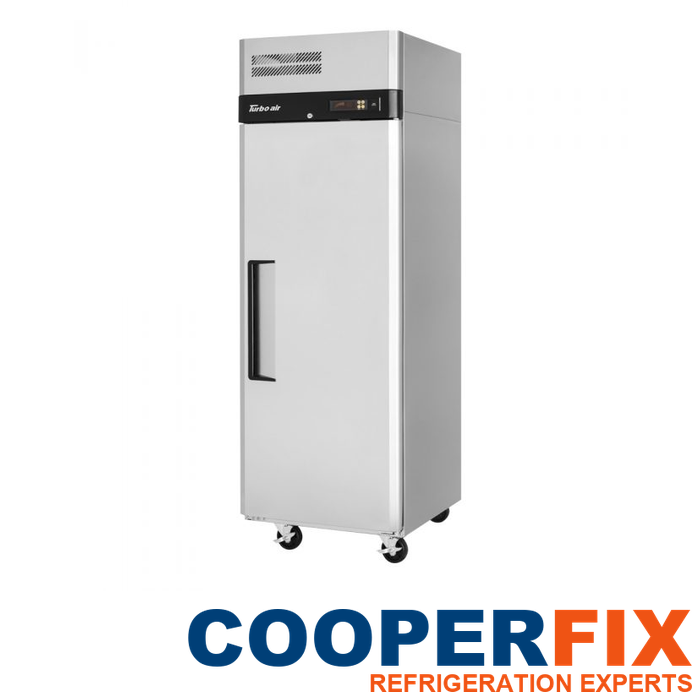
Turbo Air M3R24-1-N reach-in refrigerator
Turbo Air M3R24-1-N one-section reach-in refrigerator.

Exact model identified first
The complete model and serial details guide technical references, parts research and the service file. A similar exterior does not make two Turbo Air units interchangeable.

Operating role preserved
Reach-in storage, food preparation, undercounter access and product display create different door patterns, loading conditions, airflow demands and access constraints.

Controller and cabinet readings define the work
Temperature, recovery, controller response, airflow, fans, coils, electrical condition, condensate behaviour, heat rejection and circuit findings are evaluated before work is recommended.

Start with the Turbo Air model and operating role

Identify the Turbo Air cabinet and affected function

Identify the affected unit, share the full model if it is safely visible and describe what changed. Note the door or drawer involved, any controller message, when the condition appears and how operation is affected. These observations support coordination; a professional inspection establishes the diagnosis.

    Please prove you are human by selecting the plane.

    CooperFix services commercial refrigeration equipment only.

    Commercial refrigeration organized by cabinet role

    Match testing to the Turbo Air reach-in, prep, undercounter, or display layout

    The equipment below is grounded in four current Turbo Air manufacturer pages. It represents distinct service contexts rather than a claim that every setup shares the same components. The installed nameplate, electrical data and physical arrangement remain controlling.

    M3R24-1-N reach-in refrigerator

    Turbo Air identifies the M3R24-1-N as a one-section M3 reach-in refrigerator with a solid reversible door, top-mounted compressor, digital monitoring, LED interior lighting, three shelves, self-cleaning condenser and R290 refrigerant. Its upright cabinet separates stored-product space below from the top service area and heat-rejection path.

    CooperFix notes the door hinge and closure, gasket contact, controller display, loading pattern and any sound, alarm or temperature report. Assessment can then include cabinet temperature, recovery, evaporator and condenser airflow, fans, coils, electrical measurements, condensate handling, compressor operation and refrigeration-circuit findings. The self-cleaning feature is part of the model context, not proof that airflow surfaces or the surrounding installation require no inspection.

    TST-60SD-18M-N-SL and left-workstation variant

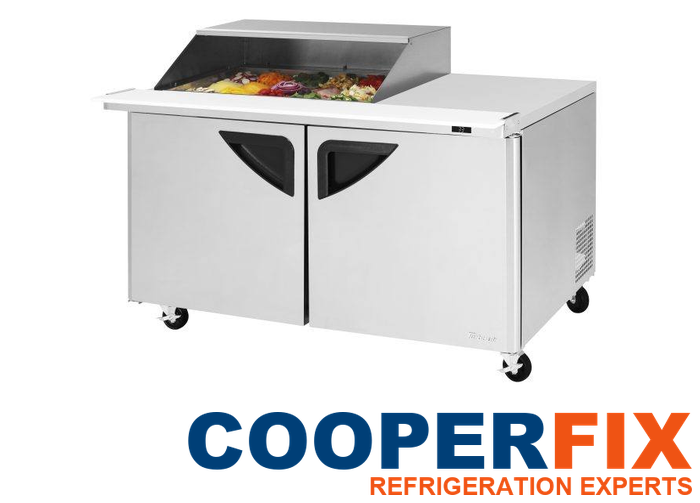
    The current manufacturer page describes a two-section Super Deluxe preparation unit with a refrigerated base, 18-pan mega-top opening, slide-back lid, solid doors, digital monitoring, LED lighting, self-cleaning condenser and R290 refrigerant. The source distinguishes right- and left-side workstation versions, so the full suffix and actual worktop arrangement belong in the service file.

    Preparation equipment operates through repeated lid, pan and base-door activity. CooperFix separates the pan area from the lower compartment during assessment, notes when the condition appears and checks relevant airflow and control behaviour. A report involving the top opening does not automatically establish a base-cabinet failure, and a lower-compartment concern does not by itself explain pan-area performance.

    JUR-48-G-N glass-door undercounter refrigerator

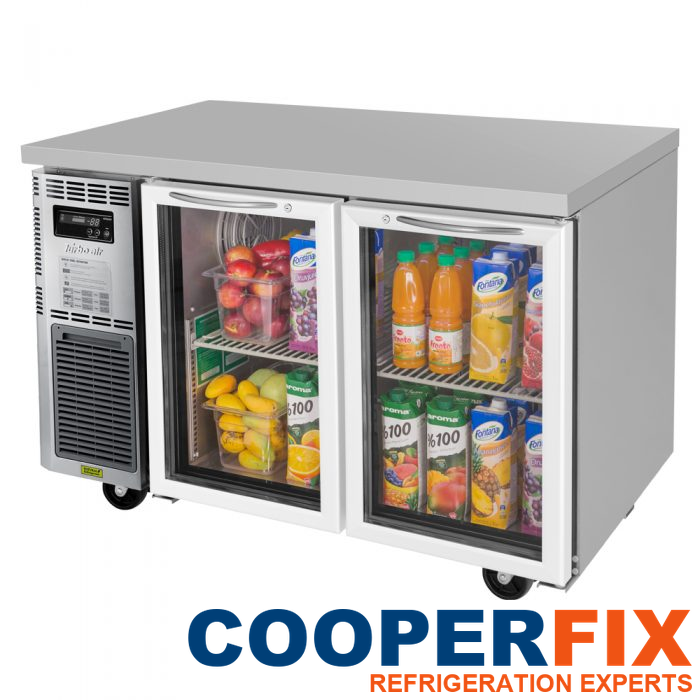
    Turbo Air identifies the JUR-48-G-N as a two-section glass-door undercounter with front air intake, a side-mounted self-contained compressor, two shelves, LED interior lighting, a hot-gas condensate system and R290 refrigerant. Its low profile and front-breathing arrangement make the installed clearance, grille area and surrounding line conditions important context.

    The technician documents both doors, gasket contact, glass condition, shelf and loading pattern, controller reading and access around the side service area. Measurements distinguish a true refrigeration performance issue from door, airflow, loading or installation factors. The unit should not be pulled from position or opened by staff to create a diagnosis.

    TGM-5SD-N6 refrigerated merchandiser

    The TGM-5SD-N6 is listed as a one-section Super Deluxe refrigerated merchandiser with a hinged double-pane Low-E glass door, two adjustable shelves, LED lighting, rear-mounted compressor and R600a refrigerant. Its display role places visibility, door use and product arrangement alongside temperature control.

    CooperFix reviews door closure, gasket contact, glass and visible moisture, lighting, shelf loading, cabinet temperature, recovery, fan operation and heat rejection as applicable. A warm product report is traced to time, location and operating pattern rather than treated as a complete diagnosis. The rear service layout also requires an access plan that protects the unit and the surrounding business area.

    Turbo Air TST-60SD-18M-N-SL preparation refrigerator
    Turbo Air Super Deluxe preparation unit with a refrigerated base.
    Turbo Air JUR-48-G-N glass-door undercounter refrigerator
    Turbo Air JUR-48-G-N two-section undercounter refrigerator.
    Turbo Air TGM-5SD-N6 refrigerated merchandiser
    Turbo Air TGM-5SD-N6 one-section refrigerated merchandiser.

    Similar symptoms can originate in different cabinet functions

    Map the Turbo Air report to its exact door, zone, and refrigeration section

    Turbo Air service calls can begin with temperature drift, slow pull-down, long or unusual cycling, a controller message, changed fan sound, frost, moisture, incomplete door closure, condensate, lighting issues or a unit that no longer recovers as expected after access. Each description identifies an effect. It does not identify the failed component.

    The technician maps the report to the equipment format. On an M3 reach-in, door use and cabinet recovery can be compared with the top-mounted system. On a preparation unit, the pan section, lid and lower base need separate observations. On the JUR undercounter, front intake, glass doors and side service layout are noted. On the TGM merchandiser, display loading, glass-door operation and rear heat rejection enter the operating picture.

    This separation prevents a common symptom from producing a common but unsupported answer. Two units may both appear warm while requiring different findings, access and repair recommendations.

    Intermittent reports need the same discipline. CooperFix notes the time of the event, door activity, loading changes, controller state and whether the unit later recovered. That history helps the technician choose a useful observation window and compare the report with current measurements. It does not justify replacing a control, fan or refrigeration component merely because that part could produce a similar symptom.

    Operating role and access pattern shape cabinet behaviour

    Note door traffic, stocking, and prep activity by Turbo Air model

    Commercial refrigeration supports inventory, preparation flow, point-of-sale access and staff routines. A reach-in may be opened in concentrated periods; a preparation unit may cycle through lid and pan activity throughout a shift; an undercounter may sit inside a crowded work line; a merchandiser may face frequent browsing and variable loading. These conditions help explain when a change appears.

    CooperFix asks which compartment is affected, when the condition began, whether it is constant or intermittent and what normal operation looked like before the change. Staff observations about product movement, door use or a displayed message are valuable when reported safely. They remain context, while technical conclusions come from measurements and inspection.

    The service file also notes access restrictions and any operating priority. Clear coordination helps the technician inspect the correct unit without merging reports from nearby equipment.

    Safe access begins with the named Turbo Air cabinet

    Coordinate service without transferring findings between nearby units

    Before the visit, the business can identify the exact Turbo Air unit, preserve any safely visible controller message and describe the operational effect. CooperFix coordinates reasonable access to the cabinet, grille or service side while avoiding promises about a cause before test results exist. Staff are not asked to remove covers, alter controls, handle components or carry out technical testing.

    During assessment, the technician keeps doors, sections and reported events traceable. If temporary product movement or an access change is necessary, the requirement is explained before the work changes. If another trade or building condition affects safe progress, that dependency is noted instead of being folded into an unsupported refrigeration conclusion.

    From Turbo Air model suffix to cabinet-specific tests

    Use the installed format and affected function to select measurements

    01 — Verify equipment model

    The technician records Turbo Air as the manufacturer, then captures the complete model, serial data, controller, door or drawer arrangement, refrigerant information where safely available and installed setup. Model suffixes and workstation orientation remain intact.

    02 — Define the operating change

    Staff observations are organized by compartment, door and time. Temperature, recovery, controller, sound, frost, moisture, lighting and condensate reports are noted without assigning a cause prematurely.

    03 — Measure relevant performance

    Assessment may include temperatures, recovery, controller and sensor response, evaporator and condenser condition, fan operation, airflow, electrical measurements, condensate behaviour, heat rejection, compressor operation and refrigeration-circuit findings. The technician selects tests that fit the confirmed unit.

    04 — Explain the recommended repair and supporting measurements

    CooperFix explains the findings, recommended work, parts research, access needs and any unresolved condition. The business receives a model-specific basis for deciding what to authorize.

    Repair follows the confirmed Turbo Air fault

    Authorize only cabinet work supported by current testing

    Turbo Air service may involve controls, sensors, fans, coils, lighting, electrical components, condensate paths, compressor components or the sealed refrigeration circuit. Exact work follows the confirmed fault. A technician may restore proper airflow, correct a confirmed electrical or control issue, address condensate conditions, replace a failed component, or continue circuit-level investigation when the test results require it. These are possible work categories, not a preselected repair list.

    Execution includes protecting the cabinet and work area, matching parts to the full model and documenting changes. On preparation equipment, the pan section and lower base remain distinct. On multi-door units, each position stays identified. After authorized work, relevant operation is observed and recorded; a short verification period is not represented as a long-term guarantee.

    Current correction and planned cabinet care are separate

    Keep Turbo Air repair and maintenance decisions distinct

    Turbo Air repair work answers a measured fault in the identified cabinet or workstation section. Preventive attention has a narrower planning role: serviceable coils and airflow paths, fan operation, controls and condensate conditions accessible on that model. CooperFix notes the active correction separately from any recurring-care proposal.

    The recurring checklist changes with the Turbo Air family. An M3 reach-in, a Super Deluxe preparation station, a JUR undercounter and a TGM merchandiser expose different doors, work sections and heat-rejection paths. Frequency follows the installed environment, use and technician findings. After the current repair has been defined, the separate commercial refrigeration maintenance planning route can address future scheduled care.

    Where the confirmed work, cabinet condition and importance of that Turbo Air station raise a wider investment question, CooperFix supplies the model-specific test results and limits of the assessment. The business retains authority over the proposed repair, a defined follow-up investigation or replacement planning.

    Model suffix, cabinet zone, and service history remain connected

    Preserve unit-level traceability for every Turbo Air cabinet

    A useful Turbo Air record contains the full model and serial information, physical setup, controller details, reported change, compartment or door involved, measurements, confirmed findings, approved work and post-work observations. It also preserves relevant installation context such as clearance, loading and access.

    Precision matters across the selected models. An M3R24-1-N finding should not migrate to a JUR-48-G-N. A right-side TST workstation should not be recorded as the left-side variant, and a TGM display observation remains attached to the merchandiser. Unknown suffixes, components or layouts are marked unresolved instead of being completed from a catalogue guess.

    Consistent records make future comparison more useful. They show what was actually observed and completed without suggesting that one visit predicts every later operating condition.

    When several Turbo Air units operate in one business, each receives its own model details and findings. Shared environmental conditions can be noted, but measurements from one cabinet are not copied to another. This unit-by-unit method protects parts research, avoids mixed service histories and gives the business a clearer view of which equipment was assessed, which work was authorized and which observations remain open.

    A future Turbo Air visit can then compare the same door, pan zone, shelf area or refrigeration section under a similar operating condition. If the cabinet configuration, controller or installation has changed, that difference is recorded before earlier readings are used. This protects model-specific parts research and prevents a result from one compartment from being treated as evidence for the entire unit.

    Which Turbo Air reach-in, prep, undercounter, and merchandiser units can CooperFix assess?

    CooperFix services confirmed Turbo Air commercial refrigeration, including eligible reach-in refrigerators, preparation units, undercounter refrigerators and refrigerated merchandisers. The exact model and installed setup are confirmed before work is scoped.

    Why is the full Turbo Air model number important?

    Series, capacity, door arrangement, compressor location and model suffix can change technical references and parts. Recording the complete nameplate keeps assessment, research and service files tied to the correct unit.

    How does CooperFix assess a Turbo Air preparation unit?

    The technician identifies the exact workstation layout, then keeps the pan area, lid and refrigerated base distinct while evaluating temperature, recovery, airflow, controls, fans, doors, coils, electrical measurements and refrigeration performance as applicable.

    What is checked on a Turbo Air glass-door undercounter?

    CooperFix reviews the exact unit, both doors, gasket contact, glass condition, loading, controller response, front airflow path, side service access, fans, coils, electrical condition, condensate behaviour and refrigeration findings as applicable.

    Does a controller message identify the failed component?

    No. A displayed message helps establish timing and operating context, but the technician compares it with independent temperatures, component operation and other test results before recommending work.

    Which Turbo Air model and cabinet-function details help begin service?

    Report the complete Turbo Air model when it is readable without disturbing the unit, then identify the door, drawer, pan section or compartment involved and the event timing. Preserve any display message, but leave grilles, controller changes and component testing to the technician.

    Continue with the affected Turbo Air cabinet

    Name the reach-in, prep, undercounter, or display function that changed

    Use the form to identify the exact Turbo Air unit and operating change. Include the model if safely visible and distinguish the affected compartment, door or worktop area. CooperFix will use those details to coordinate a model-specific assessment.

      Please prove you are human by selecting the cup.

      CooperFix services commercial refrigeration equipment only.

      Turbo Air service based on cabinet-specific findings

      Plan the Turbo Air repair from model and compartment measurements

      Tie the next Turbo Air authorization to the full model suffix, the affected cabinet section and measurements gathered on that same unit. Request service with a written recommendation that separates the active fault from optional future care.

      Request Turbo Air Service
      Review Equipment Coverage